Do Google Ads Work for Restaurants?
The short answer is that they can, and that most restaurants never find out either way. Not for want of trying — because the reporting stops at the click, and the one number that would settle it never arrives.
Open your Google Ads account on a Monday morning and you will find a great deal of information. Impressions. Clicks. Click-through rate. Average cost per click. Everything, in fact, except how many people sat down and ate.
That gap is not your fault, and it is not really Google's either. It is structural. And from today, for restaurants on Make a Rezzy, it closes: you can create Google ad campaigns inside the platform, and the report tells you how many bookings and covers each campaign produced, and what each one cost.
Why you cannot tell whether your restaurant ads worked
Google can only report on things that happen where it can see them. It knows a guest searched, saw your ad and clicked. After that, the guest lands on a booking page — and on most reservation platforms, that page lives on somebody else's domain.
The click ID that Google attaches to the visit does not survive that hop. So the booking gets made, the table gets sat, and Google never learns that any of it happened. It goes on optimising for the last thing it could measure, which is the click.
This is why so much restaurant advertising feels like guesswork. You are not short of data. You are short of the outcome, and without it you have two options: raise every budget and hope, or nudge one campaign at a time and try to read the pattern a month later. Marketing is expensive enough without paying for that kind of experiment.
What Make a Rezzy now does
Make a Rezzy runs Google ad campaigns on your behalf, aimed at the shifts you want to fill. Because the booking itself happens on Make a Rezzy, we can join the two halves back together.
You do not need a Google Ads account of your own. Campaigns run from ours, with your business named as the business being advertised — Google shows this as "Paid for by Make a Rezzy" in its ad library. You set up adverts once, we approve your monthly spend cap, and after that campaigns, tracking and reporting all live on one page.
Setting up a campaign takes a few minutes. You choose what the ads should do — fill quiet shifts, reach new guests, or promote one thing — and the days and times to push. Your quietest days come pre-selected from your own booking pattern, so you are not guessing at that either. Write it for me drafts a headline and description from your business's details, plus a few spare headlines for Google to test, and you can edit or delete any of them. Every campaign needs three to five real photographs of your restaurant; we do not allow stock images of someone else's dining room.
The part that makes the ads get better
This is the bit that matters, and it is worth being precise about.
When a guest who accepted tracking books through one of your ads, we report that booking back to Google as the result the advert paid for. Google's bidding then has a real outcome to learn from, so it starts looking for people who behave like bookers rather than people who behave like clickers.
And when a booking is later cancelled or marked as a no-show, we withdraw it. Google is told the result did not stand. Campaigns are not trained on tables that never sat.
That second half is the one almost nobody does. It is easy to send good news to an ad platform. Sending the corrections is what stops you optimising towards an audience that books beautifully and turns up rarely.
What the Ads page shows you
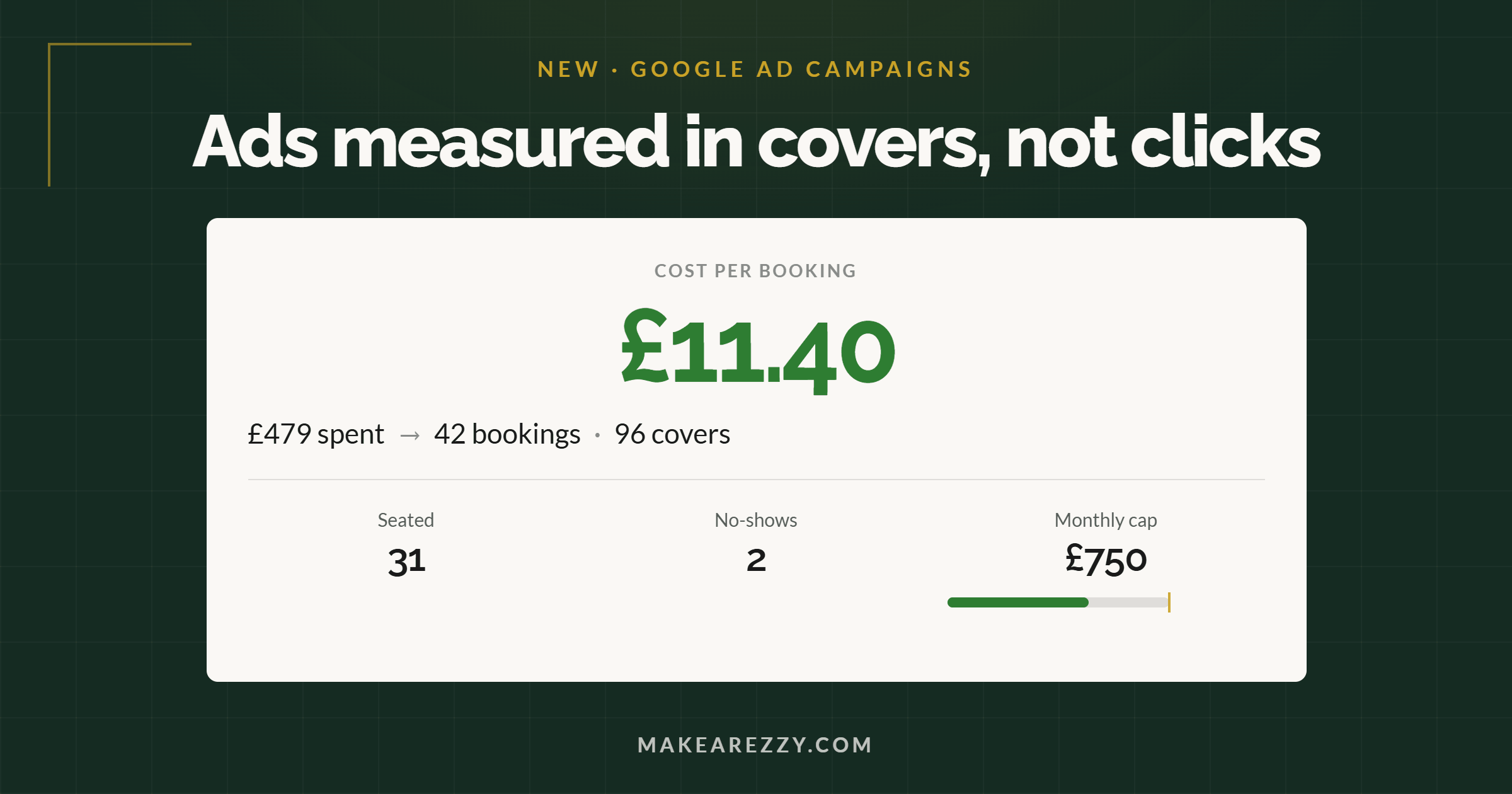
Open Ads from the Campaigns menu and the summary answers the question you started with:
- Cost per booking — everything spent across your campaigns in the range, divided by the bookings those campaigns produced. Compare it with what a table is genuinely worth to you.
- Spent, bookings, covers — the three figures behind that number.
- Seated and no-shows — how those bookings actually turned out. Bookings still in the future count as bookings, but not yet as seated.
- Monthly cap — the ceiling you agreed, with a bar showing how much of it the period's spend represents.
Below that, every campaign has its own row: platform, running or paused, daily budget, and its own spend, bookings, covers, cost per booking and no-shows. You can pause, resume or change a daily budget from the row, and the change goes to Google straight away.
When there is something worth acting on, cards appear above the list — a campaign booking tables cheaply that could take a bigger budget, one that has cost too much per booking a fortnight running, spend that is producing no bookings at all, or a promoted shift that is already nearly full. Each card states the figures behind it. Nothing changes unless you change it.
Are these figures accurate?
They are conservative, deliberately. Guests who decline tracking on your booking page are not counted against any campaign, even when an advert genuinely brought them. So the numbers on the Ads page are a floor, not a ceiling — the real return is at least that good.
Bookings are counted by the date they were made, not the date of the visit, because that is how the ad platforms report too, and lining the two up is the whole point.
Which booking systems can track Google ad bookings?
Most reservation platforms can tell you which broad channel a booking came from. Very few can tie a booking to a specific advert, and — as far as their own public documentation shows — none of them send confirmed bookings back to Google as the conversion, or withdraw the ones that cancel.
Based on each platform's published documentation as of September 2026:
| Platform | Ad tracking it documents |
|---|---|
| OpenTable | Channel and campaign tracking through tagged booking links, plus a self-serve Meta Pixel field. Google Ads conversion tracking is set up by an account manager rather than by you. Boost places you higher in OpenTable's own marketplace, charged per seated cover — that is marketplace placement, not your own Google campaigns. |
| ResDiary | A strong Channels concept and a booking source report. Google Ads conversions rely on redirecting completed bookers to a confirmation page you host yourself, where you place the Google tag. One event, no booking value attached, and it does not work with an iframe widget. |
| SevenRooms | Tracking links and UTMs on the widget, and genuinely good POS-linked revenue reporting on email campaigns. No native Google Ads conversion or Meta CAPI support documented; agencies catch widget events with their own tag manager. |
| Tock | Self-serve GA4 and Meta Pixel fields. Both are browser-side only — there is no offline or server-side upload of confirmed bookings back to Google. |
| Resy | Channel-level reporting. No campaign tagging or advertising pixel support documented. |
| TheFork | Reporting on promotions inside TheFork's own ecosystem. No documented hooks for your own Google or analytics tags. |
| Make a Rezzy | Campaigns created and managed in the platform. Bookings, covers, seated and no-shows reported per campaign, plus cost per booking. Confirmed bookings sent back to Google as the conversion, and cancellations and no-shows withdrawn. |
Outside reservations, the closest thing is a point-of-sale platform managing Google and Meta campaigns for restaurants and reporting sales against them. That is a good product and a fair comparison — the difference is what counts as the result. A till measures the sale after the guest has already arrived. We measure the booking, which is the thing an advert can actually cause, and we correct it when the booking falls through.
If you are already advertising through an agency, the comparison worth making is the reporting. UK agencies typically charge several hundred pounds a month, or a share of your spend, and report clicks and conversions from a tag on your website. Ask what a booking cost. If the answer involves a spreadsheet and an estimate, that is the gap this closes.
What it costs
Make a Rezzy's own pricing is unchanged: no subscription, £1 per cover booked.
For advertising, you set a monthly cap that covers media spend — the money that goes to Google. On top of that we charge a commission, a fixed percentage of each campaign's budget, and the rate and what it comes to are shown on screen before you set a budget, both when you create a campaign and when you change one. VAT is added to the media spend and the commission. Nothing runs until you have agreed the terms and we have approved your cap.
How the cap protects you
Your monthly cap is the most we aim to spend on your adverts in a calendar month. We check your spend every ten minutes, and as soon as the month's spend plus one more day of your running campaigns' budgets would pass the cap, we pause the campaigns. The page tells you why. They start again on their own when the new month begins.
Ad platforms report spend with a short delay, so a month's total can differ slightly from the cap — but launching a campaign, resuming one, or setting a new daily budget is always checked against the room left underneath it first.
Are Google ads worth it for a restaurant?
Sometimes. It depends on what a table is worth to you and what a booking ends up costing, which is exactly why we put those two numbers next to each other rather than telling you the answer. Being clear about the edges is more useful than a longer list of features:
- Google only, for now. Facebook and Instagram appear in the campaign wizard marked Coming soon and cannot be selected yet.
- It is not a magic multiplier. Advertising fills quiet shifts at a cost. The point of showing you cost per booking is so you can decide whether that cost is worth paying, not to persuade you that it always is.
- It does not replace your own marketing. Your regulars, your email list and your local reputation will out-earn any advert. This is for the gaps.
- Guests who decline tracking are invisible to it. We would rather under-report than quietly follow people who asked us not to.
Who this is for
It suits a restaurant with shifts it would like to fill and no appetite for running an ad account: a midweek dining room that is half empty while Saturday turns away tables, a new opening that needs to be found, a site with a private room or a set menu that deserves promoting. If you already have an agency and a working attribution setup, you may not need it. If you have ever paid for ads and quietly wondered whether they worked, you probably do.
Getting started
Ads are running with a small number of restaurants while we refine the service, so setup goes through a short review. Choose Set up adverts on the Ads page, tell us the legal name the adverts run for, what a typical guest spends with you and the monthly cap you want, and agree to the advertising terms. We will review your cap and email you when it is approved.
Not with us yet? Book a demo and we will show you the Ads page with real numbers on it, or email support@makearezzy.com and we will answer whatever this post did not.
Google Ads is a trademark of Google LLC. Make a Rezzy is not affiliated with or endorsed by Google. Comparisons above are drawn from each platform's own published documentation as of September 2026 and may change.
Common questions
Do Google ads work for restaurants?
They can, but most restaurants never find out exactly how well, because Google reports clicks rather than bookings. The only way to answer it for your own restaurant is to measure what a booking costs and compare that with what a table is worth to you.
Are Google ads worth it for a restaurant?
It depends on your cost per booking and the value of a table. A quiet Tuesday filled at £3 a booking is worth having; the same booking at £40 is not. Make a Rezzy shows both figures side by side, so the decision is arithmetic rather than instinct.
Do I need my own Google Ads account?
No. Campaigns run from Make a Rezzy's Google account, with your business named as the business being advertised. Google shows this as "Paid for by Make a Rezzy" in its ad library.
Can you track which bookings came from a Google ad?
Yes. Because the booking happens on Make a Rezzy, each one records the campaign that brought it, so the Ads page reports bookings, covers, seated and no-shows per campaign. Guests who decline tracking are not counted, so the figures are a minimum.
What happens if a booking from an ad cancels or no-shows?
We report it back to Google as withdrawn, so campaigns are not trained on tables that never sat. Almost no platform sends these corrections, and without them, bidding drifts towards people who book and do not turn up.
How much do Google ads cost for a restaurant?
You set a monthly cap covering media spend. On top of that, we charge a commission, a fixed percentage of each campaign's budget, shown on screen before you set it. VAT is added to both. Nothing runs until you agree to the terms and we approve your cap.