Two awkward parts of the job: the guest who rings to say they cannot make it, and the guest who simply does not turn up. Make a Rezzy handles them differently — Cancelled for the first, No-Show for the second — and keeping the difference sharp matters for your reports, your floor, and the guest's profile.
Cancelling a booking
Use Cancelled when you know in advance that the guest is not coming — they have rung to cancel, sent you a message, or asked through their confirmation email.
- Open the booking from the Calendar, Bookings list, or Live Floor Plan.
- Change Status to Cancelled.
- Click Save Changes.
- Tap the booking on Today or in the Diary.
- Tap Cancel booking, then confirm. The booking is cancelled as soon as you confirm.
Three things happen as soon as you save:
- The table is released — your floor plan immediately shows the slot as free.
- The guest gets a cancellation email, so they know it is done.
- Your team gets a copy — same email, sent to your business address, so anyone on the rota knows the booking is off.
Guests cancelling themselves
The confirmation email a guest receives links back to their booking page on Make a Rezzy. From there, after signing in to their account, they can cancel the booking themselves.
When a guest cancels this way, the booking moves to Cancelled in your diary on its own — your team does not need to do anything. Both you and the guest still get the cancellation email.
Marking a no-show
Use No-Show when the booking time has passed and the guest never arrived. Set it once it is clear they are not coming — usually fifteen or twenty minutes after their slot.
- Open the booking.
- Change Status to No-Show.
- Click Save Changes.
- Tap the booking on Today or in the Diary.
- Tap Mark as no-show. It takes effect straight away — if you tapped it by mistake, use Edit details to put the status back.
Quicker still: swipe the booking's card to the left on Today or in the Diary list and tap Undo on the message that follows if you got the wrong party.
No email is sent. There is no point chasing a guest who has already let you down, and most operators prefer not to make it a thing.
No-show versus Cancelled
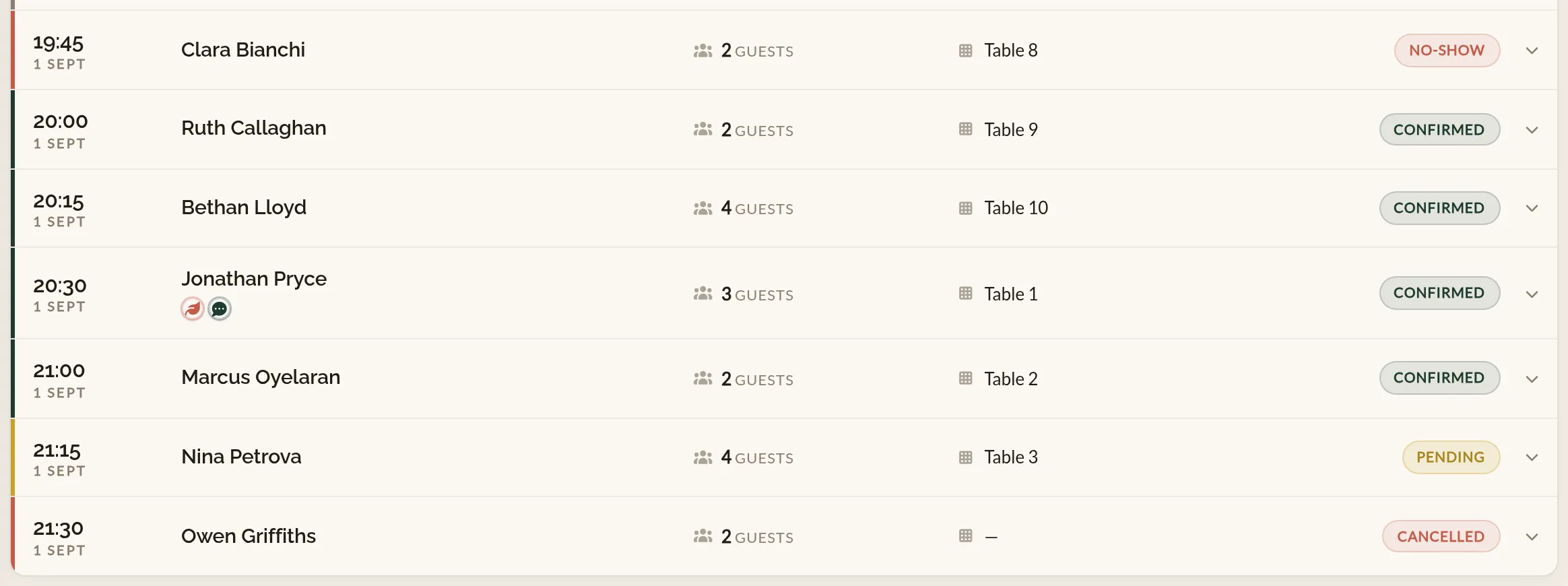
The two statuses look similar but feed reports and guest history differently. A quick rule of thumb:
- Cancelled — the guest told you they were not coming. Counts as a cancellation in your reports. The guest's profile is not affected.
- No-Show — the guest did not turn up and did not tell you. Counts as a no-show in your reports, and adds to the no-show count on the guest's profile.
If a guest rings up after their slot to apologise for not turning up, that is a judgement call — most operators leave the status as No-Show so the profile stays honest, but you can change it to Cancelled if you would rather.
What about the deposit?
If a deposit was taken on the booking, Make a Rezzy handles the refund for you based on your free cancellation window:
- Cancellation inside the free window — the deposit is refunded in full automatically the moment the booking is cancelled.
- Cancellation after the free window — the deposit stays with you, as the policy promised the guest at booking.
- No-shows — the deposit always stays with you. No refund is issued.
Your team does not need to do anything for any of these — it is part of the cancellation.
Sometimes you will want to refund a deposit the rule would have kept — a regular cancelling at the last minute, a goodwill gesture, a genuine emergency. Make a Rezzy lets you issue that refund from the booking itself, without leaving the app. See Deposits and refunds for the full picture.
Why mark these rather than delete
Cancellations and no-shows are not noise — they are some of the more useful data your restaurant collects. Pacing decisions, no-show deposit policies, and guest VIP/blocklists all build on them. If you delete a booking instead of marking it, you lose that signal.
Make a Rezzy does not actually let you delete a booking from the diary. Cancelled and no-show bookings stay in the diary, just out of the way.
Where to go next
- Deposits and refunds — when a deposit is taken, and what to do with it on a cancellation.
- Guest profiles — how no-shows and cancellations build up on a guest's record.
- Modifying a booking — if the guest wants to move the booking rather than cancel.
See also: Deposits and no-show protection