Bookings can come from a few different places, and every booking moves through a small set of statuses on its way through service. Here is what happens between a guest making a booking — a table, an event, or a bookable service — and them leaving at the end of their visit.
Where bookings come from
Make a Rezzy collects bookings from a few sources:
- Your website widget — the booking form you embed on your own site.
- Your Explore listing — diners browsing Make a Rezzy can book without leaving the directory.
- By phone — when a guest rings the restaurant, your team adds the booking manually.
- Walk-ins — when a guest arrives without a reservation, you can record them as a walk-in.
- Your services page — if you offer bookable services (classes, treatments, sessions), guests book them from your services page. Those bookings land in the same diary, marked with the service they are for. A guest who books several services in one go pays for them once, but each one is still its own booking in your diary. Your team can also book a service for a guest themselves — see Taking a booking by phone.
Every booking — wherever it came from — ends up in the same diary.
To seat a walk-in from the app, tap Walk-in on Today (or open Diary, tap +, then Now · walk-in). Choose the party size; the best free table for the party is picked for you — tap another, or Auto to let the system place them — then tap Seat now. The booking is saved as Seated with its source set to Walk-In; a name and phone number are optional. A business without table bookings has no walk-in button; its + books a guest into a service instead — see Taking a booking by phone.
Booking statuses
Each booking has a status that tells your team where it is in the journey:
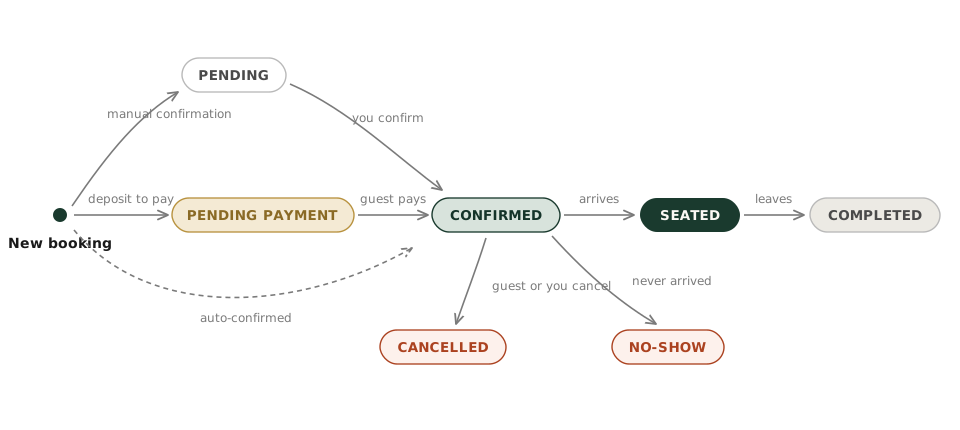
- Pending — waiting for confirmation. Usually waiting for the restaurant to confirm the booking (if you have set up manual confirmation).
- Pending Payment — waiting for a deposit or payment. The guest has made the booking but has not paid the deposit or for the event yet. The booking is not confirmed until the payment is made. A booking the guest made themselves is cancelled if it is not paid within 30 minutes.
- Confirmed — the booking is set. The guest has been emailed a confirmation and any outstanding deposits or payments have been made.
- Seated — the guest has arrived. For a table booking, the table is occupied and the booking is in service.
- Completed — the guest has finished and left.
- No-show — the guest did not turn up.
- Cancelled — the guest (or the restaurant) cancelled the booking.
What a booking owes
A booking's status says where the guest is in their journey, not where their money is.
Anything with something to pay — a deposit, an event ticket, a bookable service — also carries a payment label alongside its status, on the Bookings list and in the booking window: paid, part paid, still owed, due on arrival, or a deposit to take off the bill. The Bookings list can be filtered by that state, so chasing what is unpaid is a single filter away. See Deposits and refunds for what each label means.
A guest can book several services at once. Each of those bookings says so under its payment details in the booking window — for example, "Booked together with 2 other bookings". The payment label and amounts are still that booking's own: one may be paid in full while another is due on arrival.
Tap a booking on Today or in the Diary to open it. Under the booking's details a payment line says where the money stands: paid, part paid, still owed, due on arrival, or a deposit to take off the bill. See Deposits and refunds for what each label means.
A guest can book several services at once. Open one of those bookings and it says so beneath its payment details — for example, "Booked together with 2 other bookings". The payment label and amounts are still that booking's own: one may be paid in full while another is due on arrival.
What happens automatically
Make a Rezzy sends a handful of emails on your behalf, so your team does not have to:
- A confirmation email the moment a booking is made.
- A reminder email the day before the booking.
- A thank-you and review email 24 hours after the guest has dined.
See Notifications and emails for what each of those looks like.
Where to see your bookings
There are three ways to look at the diary:
- The Calendar — the day laid out as a timeline: by table on the Tables view, and by team member and service on the Services view if you offer bookable services.
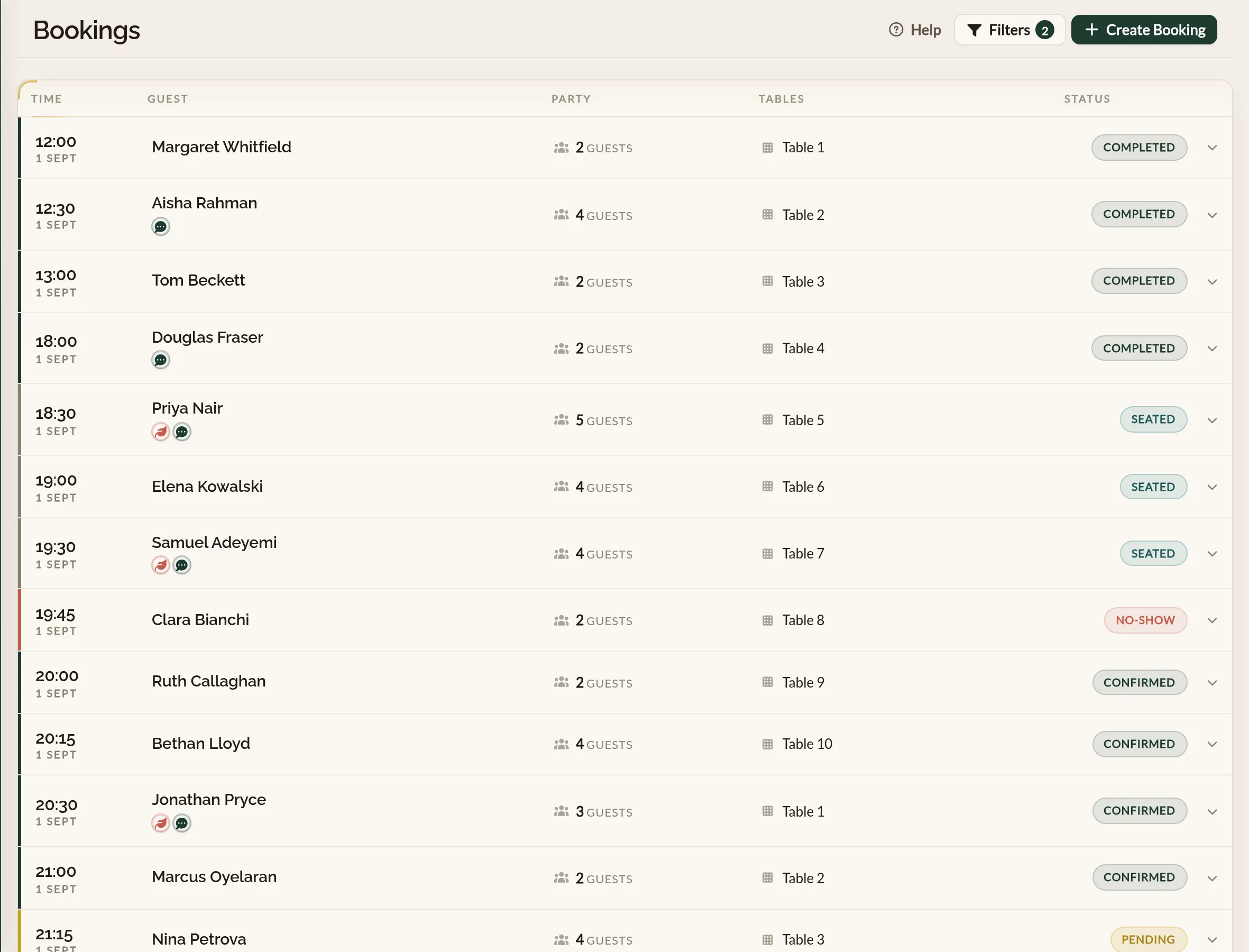
- The Bookings list — a sortable list of every booking with filters for date, status, party size, guest, and payment.
- The Live Floor Plan — a visual representation of the restaurant's layout, showing which tables are occupied and which are available.
On the mobile app, the diary lives in a few places:
- Today — the service at a glance: covers booked, seated now, anything that needs attentions — tomorrow's unconfirmed bookings, bookings without a table, bookings outside your opening hours — and the pre-shift counts, which open the pre-shift brief.
- Diary — any day's bookings. Pick a day from the strip at the top, swipe left or right to move a day at a time, or tap the calendar to jump further. Three views sit under the strip: List groups the day by period (lunch, dinner and so on) — or by team member if you book people rather than tables — with each booking's status on the right; Timeline lays the day out by table, or by team member and service like the Calendar's Services view; Floor shows the floor plan with each table's state, and only appears once you have a floor plan. Chips above the list narrow it by status, period and team member. Swipe a booking right to seat it or left to mark a no-show.
See also: The restaurant booking diary