The pre-shift brief is a single screen that shows everyone booked for a service before you open the doors — who they are, how often they have visited, anything the kitchen needs to know, and any requests they have made. It turns the guest details you already hold into a briefing your front-of-house team can read at a glance.
Opening the brief
In the sidebar, under Operations, choose Pre-shift. The brief opens on today's service. Use the arrows either side of the date, or the date picker, to move to another day — handy for prepping tomorrow's lunch the night before.
On the mobile app, tap the Pre-shift card at the bottom of Today — it opens the brief for the day on screen, so peeking at tomorrow first gives you tomorrow's brief. The brief is also under More as Pre-shift brief. Use the arrows either side of the calendar button to move a day at a time, or tap the calendar to jump further. Pull down to refresh.
The layout is the same as on the web: the summary tiles across the top, then the guests in seating order. Tap a guest to open the booking — the same sheet as on Today and in the Diary — to confirm, seat, or edit it.
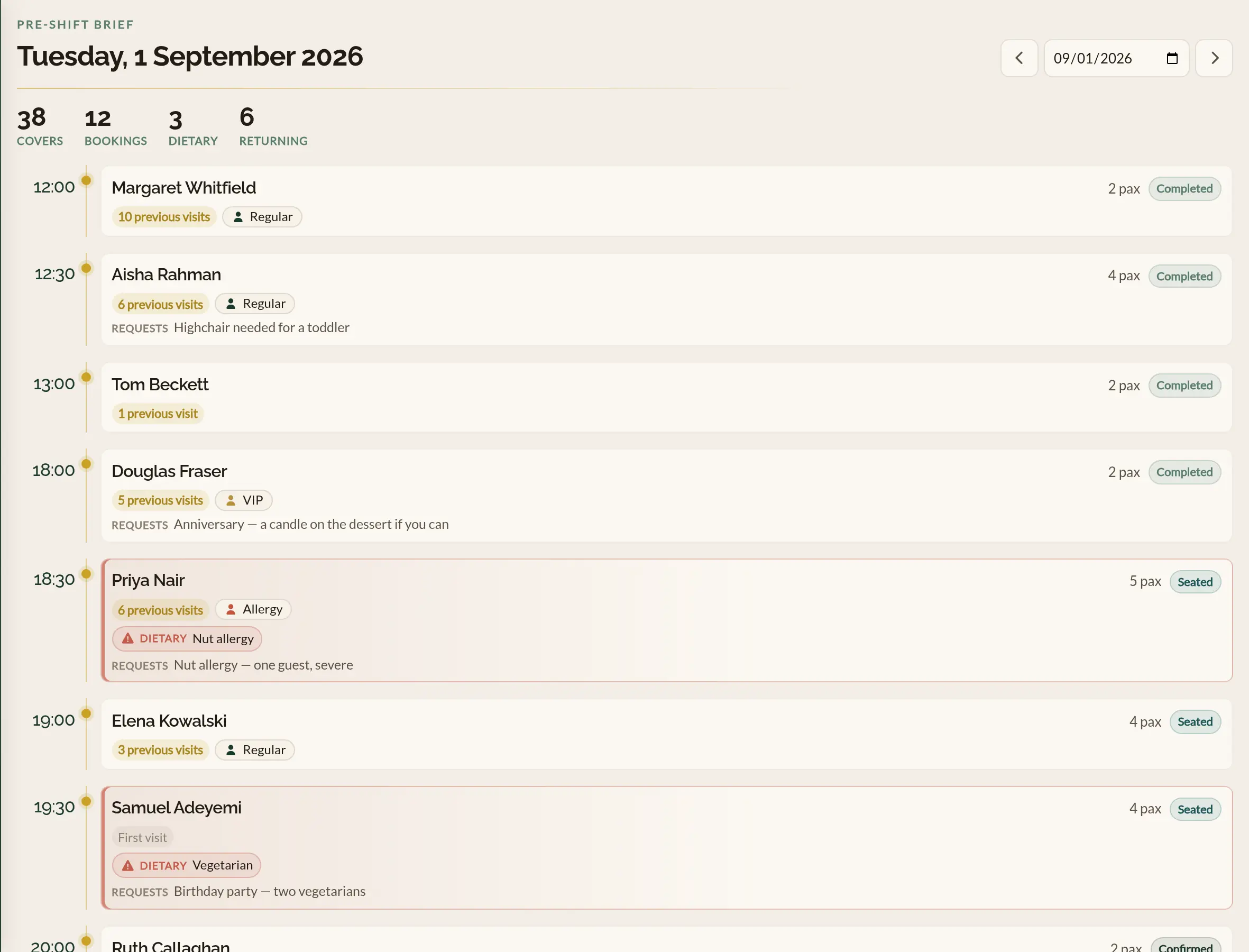
Reading the roster
Guests are grouped into seating waves by booking time, earliest first, so the roster reads in the order the service will unfold. Each guest shows:
- Name, party size, and status — the booking's current status (Confirmed, Pending, Seated, Completed) is shown as a coloured pill, the same colours used on the Calendar.
- Visit history — a badge reading First visit for a newcomer, or 3 previous visits for a returning guest. Returning guests are highlighted in amber so regulars stand out.
- Dietary needs — if the guest's profile records any dietary restrictions, they appear in a coral flag so the kitchen can see them without opening anything.
- Tags — both the guest's own tags (such as VIP or Regular) and any tags on this particular visit.
- Requests — the special requests left on the booking, for example a birthday or a quiet table.
- Payment — a label on any booking with money attached, saying whether it is paid, part paid, still owed, due on arrival, or carries a deposit to take off the guest's bill. See Deposits and refunds for what each one means.
Cancelled and no-show bookings are left off the brief, since it is about who to expect for the service.
The service summary
Across the top of the roster, a short summary tallies the whole service: total covers, the number of bookings, how many carry a dietary need, and how many are returning guests. It is the quickest way to gauge how busy the service is and how much special handling it needs.
When there is money on the service, two more tallies join them: To collect, the total still owed across the service and how many bookings it covers, and Deposits to credit, the total already paid in deposits that comes off guests' bills. Bookings that owe money but carry no price are counted in To collect and noted as not priced, rather than being added to the figure.
Where to go next
- Guest profiles — where dietary needs, seating preferences, and notes are stored.
- Tags and notes — creating tags such as VIP and applying them to guests and visits.
- How bookings work — the statuses a booking moves through during service.
See also: The restaurant guest CRM